
A self-service portal for all your vendors
Your vendors get a secured, dedicated account to login and submit invoices
Receive and Post Invoices as Bills in QuickBooks Desktop
Notable Features
1
Eliminate Manual entry – Let your Vendors do the data entry for you!
2
Vendors can be set up to use only a few defined item names like Labor, Material, Mileage etc.
3
Streamline and Automate – Eliminate multiple channels (Paper, Email, Fax etc.) of receiving invoices
4
Dedicated and Secure Account for you and your Vendors
5
Attachment and Notes for easy communication
6
Approval processing
7
Smart Posting – System automatically learns how your map your Invoice lines to bill lines
8
Create Customer Invoice from Vendor Invoice with markup – System allows you to create customer invoice with predefined markup, item name change etc. These invoices can be exported to QuickBooks.
9
Bulk Posting – Save time; even more!!
10
Email notifications
11
Ease of use
Invoice approval module allows manager to approve invoice, before posting bills to QuickBooks Desktop
Useful when bookkeepers require client approval for posting of vendor invoices to QuickBooks
While creating bills, system uses memorized data to map vendor bill item name to QuickBooks bill item name, to reduce data entry and provide consistency
Ability to store details in vendor invoice like bill line memo, item descriptions as bill line description, bill memo
Once the mappings requirements are setup, you will be able to post multiple vendor invoices as bills, with a single click
Additional validations can be set up like, set Billable to Yes, if Customer Job is assigned, you can make customer job as a required field
Set payment date automatically, based on invoice received date, payment terms
Keep track of when Invoice is sent
You and your vendors can view old invoices online for up to three years, including notes and attachments
Vendor can see document history, including when the invoice was viewed, approved and posted to QuickBooks Desktop. Reduces vendor queries on invoice status.
Receive invoices from vendor and create customer invoices with appropriate markup automatically
You can predefine the rate you want to charge your customers – mark up by percentage or specific amount for each invoice item
Send invoices to customer and export it to QuickBooks
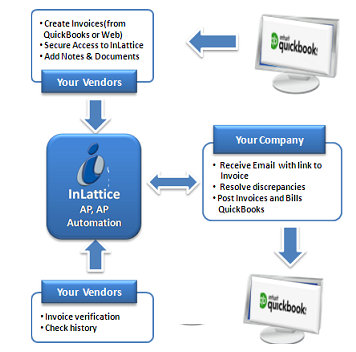
Process Flow Screen
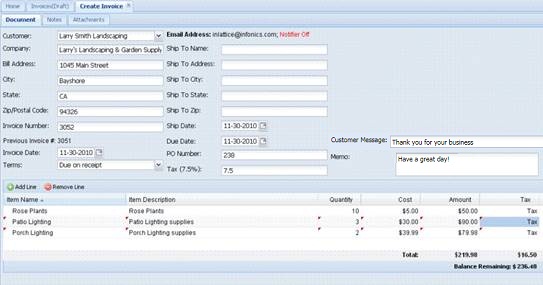
Create Invoice Screen
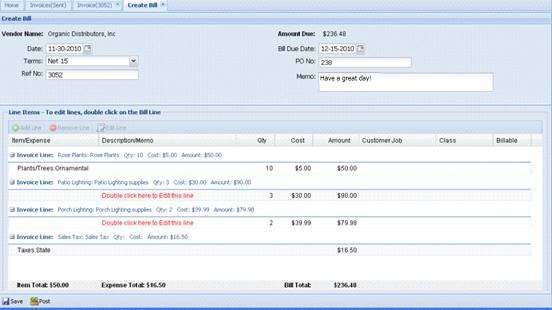
Bill Posting Screen
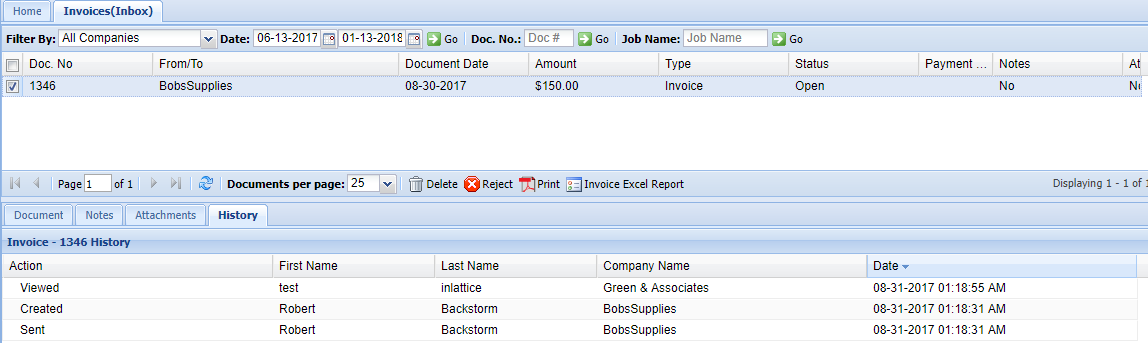
Document History Screen