
Your customers get a dedicated account to login and view all your invoices
Customer can view, pay and print invoices just by clicking on invoice link in email
Setup automatic late payment email notification and optionally, generate late payment invoice
Supports Authorize.net, BluePay, PayPal Pro, PayPal Express Checkout, Braintree, Stripe Payment Gateway, to get paid with any credit cards
Create invoices online and post it to QuickBooks later
Online payment with Credit Card, ACH and payment posting to QuicBooks Desktop
Notable Features
1
Invoices can be created either online or in QuickBooks
2
Provide online access to customer invoices
3
Online Payment Processing – Receive payments online by ACH, Credit Cards
4
Partial payment option
5
Post Payments to QuickBooks Desktop using Web Connector
6
Dedicated and Secure Account for you and your customers
7
Ability to setup automatic late payment email notification and optionally, generate late payment invoice
8
Attachment and Notes for easy communication
9
Email notifications
10
Ease of use
System allows either import of invoices created in QuickBooks or invoices can be created online on the web without access to QuickBooks
Useful to allow field staff to create invoices at the customer premises
Invoices created Online can be exported to QuickBooks, without re-entering it in QuickBooks
You can enable setup to automatically generate payment pending notification email
Automatically generate late fee/interest invoice
Late fee calculation based on either by percentage of balance due amount or fixed fee
When invoices are sent, customers will receive an email, with a link to the invoice
Payment can be made using credit card, ACH, based on your requirement
Partial payment supported
Payments can be posted to QuickBooks, with no data entry
Each document history is tracked including when it was sent, viewed by customers, paid etc.
Customers can view old invoices online for up to three years
All notes and attachments are also kept for three years
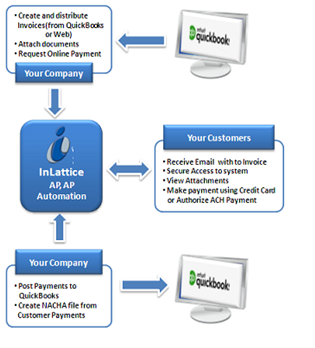
Process Flow Screen
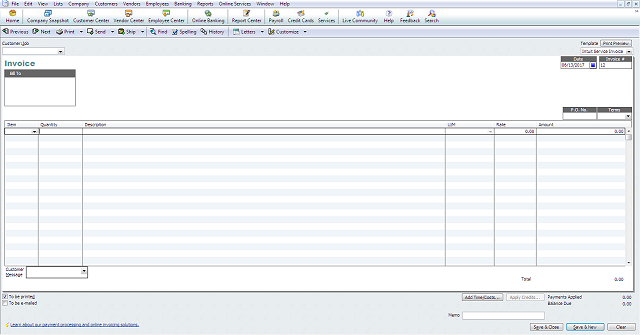
Create Invoice Screen
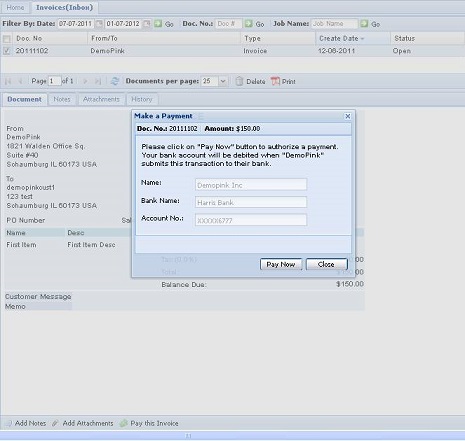
Invoice Payment Screen

Payment History Screen