
Get paid faster, easier and cheaper
Receive payments using ACH/NACHA file
Make direct deposits to vendors

Stop writing, mailing checks
Notable Features
1
Supports various ways to create ACH NACHA file, based on data in QuickBooks
2
Customer can authorize payments online
3
Pre-approved payments can be processed based on invoices in QuickBooks
4
Vendor direct deposit based on payments in QuickBooks
5
Email notifications of payments
ACH provides a cheaper, faster way to get paid compared to credit card payment or check payment
NACHA file is created, without any additional data entry
Used for collecting pre-approved rent, monthly services charges, membership fee for associations
Online payments are posted to QuickBooks
Stop writing, mailing checks; Make direct deposit to vendors
Payments based on data already created in QuickBooks
Automatic email notification about direct deposit to vendors
Most of the banks accept ACH/NACHA file to process customer payments, vendor direct deposits
System provides a authorized payment report, before creating the NACHA file
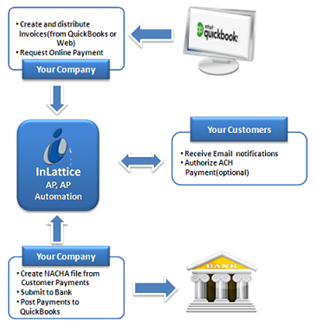
Process Flow of Customer Payment Screen
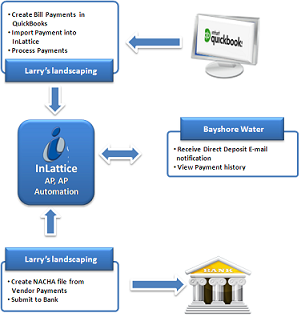
Process Flow of Vendor Payment Screen
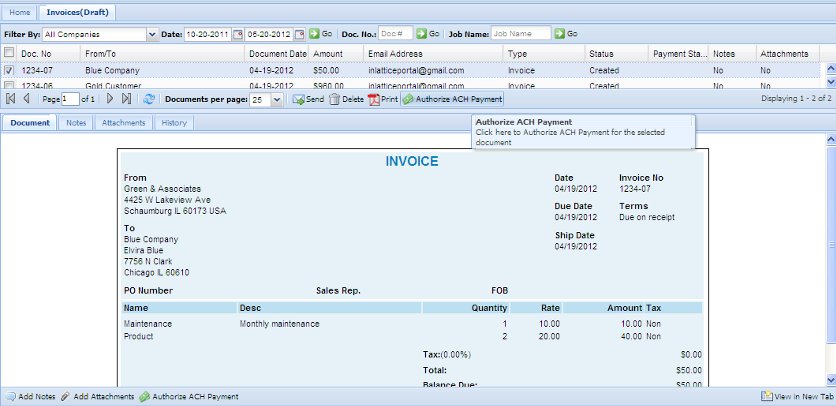
Authorize Payment Screen
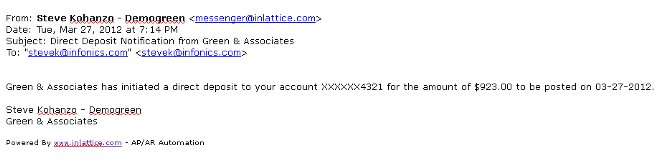
Deposit Email Notification Screen